3 Ways to Prepare a Portable Power Station for Outages
A portable power station can only help during an outage if it is charged, tested, and stored properly before the lights go out. Preparation is simple, but skipping it can leave you with low battery, incompatible devices, or missing cables when power is unavailable. The best approach is to treat your unit like emergency equipment rather than occasional convenience gear. That means checking charge levels, confirming what it can realistically run, and keeping all supporting accessories together in a safe place. With a few practical habits, you can make sure your portable power station delivers reliable backup power when you need it most at home.
image
Keep Your Portable Power Station Charged and Ready
Check Battery Levels and Recharge Before an Outage
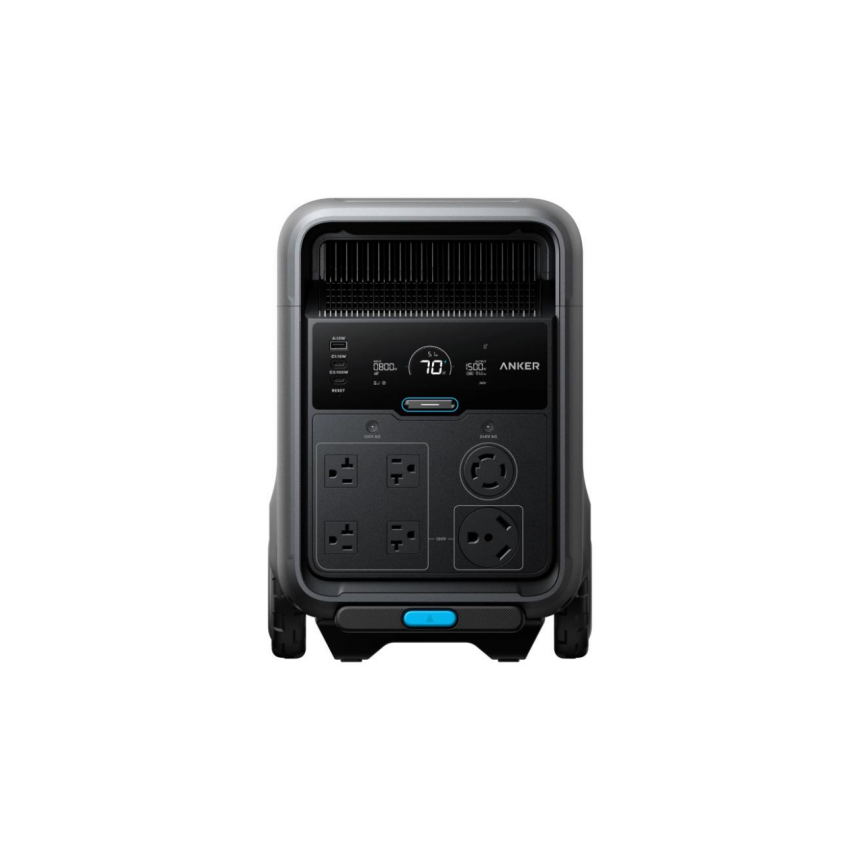
Start by checking your portable power station’s battery level on a regular schedule, especially before storms, heat waves, or utility maintenance periods. A backup unit should not sit nearly empty and then be expected to perform during an emergency. Recharge it as soon as capacity drops below your preferred reserve level, and top it off when severe weather is forecast. If your model supports fast input, use that advantage ahead of time. For example, the Anker Solix S5000 supports up to 4,300W charging power per single unit, with AC input up to 1,800W on 120V or 4,500W on 240V, helping you restore capacity quickly before an outage begins.
Maintain Battery Health With Regular Charging and Inspections
Battery readiness is not only about keeping the charge high; it is also about preserving long-term battery health. Follow a regular charging routine based on the manufacturer’s guidance rather than leaving the unit neglected for months. Inspect the casing, ports, screen, cooling vents, and cables for dust, corrosion, or damage that could affect performance. Keep firmware updated if your unit includes app controls or software features. Lithium iron phosphate batteries are valued for durability, but they still benefit from proper care. A unit built with LFP cells and rated for 10,000 cycles can provide dependable backup over many years when you charge, store, and inspect it consistently and carefully.
Test Your Backup Power Needs and Essential Devices
Calculate Your Power Requirements for Essential Appliances
Before an outage happens, decide which devices actually matter most and add up their running wattage. Start with essentials such as a refrigerator, internet equipment, lights, phones, medical devices, or a fan, then compare the total with your power station’s continuous output and battery capacity. This step prevents overloads and helps you prioritize usage during a blackout. Remember that some appliances need extra startup power, so leave a margin rather than pushing the unit to its maximum. Make a short list of must-run items and estimate how many hours you need them powered. Once you know your load, you can create a practical backup plan instead of guessing under pressure.
Test Device Compatibility and Explore High-Capacity Backup Options
A paper plan is useful, but a real-world test is better. Plug in your essential devices before an emergency and confirm they power on, charge correctly, and stay within safe output limits. Check whether sensitive electronics benefit from fast switchover support, especially if you want backup protection for networking gear or office equipment. If your household needs more coverage, consider a higher-capacity system that can support larger loads and multiple input methods. A unit with 5,024Wh capacity, 4,500W max AC output, and UPS switchover time of 10 ms or less can handle broader emergency use. Testing now helps you avoid surprises when power reliability becomes urgent during an outage.
Store Your Portable Power Station Safely and Prepare Accessories
Choose a Suitable Storage Location and Protect the Battery
Store your portable power station indoors in a clean, dry, and well-ventilated area where temperature stays within the recommended range. Avoid direct sunlight, damp basements, hot vehicles, and places near open flames or chemicals. Good storage protects both the battery and the electronics inside the unit. Make sure the station is easy to access during a late-night outage, but keep it positioned where it will not be bumped, blocked, or exposed to dust buildup. For added protection, review the operating temperature limits for both charging and discharging before seasonal weather changes. Stable storage conditions reduce battery stress and help ensure dependable performance when emergency backup power is needed.
Prepare Charging Cables, Adapters, and an Emergency Power Checklist
A fully charged power station is far more useful when every accessory is ready with it. Keep AC charging cables, solar connectors, device charging cords, and any required adapters stored together in one labeled bin or pouch. Add a printed emergency checklist so anyone in the home can use the system quickly. The list should include how to turn the unit on, which appliances to connect first, safe extension cord use, and when to recharge from wall power, solar, or a compatible generator input. Also note priority items such as phones, lights, medical equipment, and internet devices. Organized accessories save time, reduce confusion, and support safer backup power use during outages.
Conclusion
Preparing a portable power station for outages comes down to three practical actions: keep it charged, test what it needs to run, and store it with the right accessories. These steps turn backup power from a good idea into a dependable emergency resource. Regular charging protects readiness, load testing helps you avoid overloads, and thoughtful storage keeps the unit safe and easy to access. Small habits completed ahead of time make a major difference when an outage interrupts daily life. If you rely on backup power for comfort, communication, work, or critical devices, preparation should be part of your routine. A portable power station performs best when you treat it like emergency equipment and keep it ready year-round.
Hot Articles







Copyright © 2023 furnitureknowledges.com. All rights reserved.